become a launching partner NL

for heat pump installers/

Software for heat pump installers, from the questionnaire to the quote.

Fikst is the system for your whole heat pump business. Your customer fills in a questionnaire at home, with photos of their meter cupboard and the spot for the outdoor unit. Your adviser walks in with those answers already on their phone. Then you work out the heat loss, put the unit on the quote, and the Dutch ISDE subsidy appears alongside it by itself.

If you also do home batteries, solar panels or air conditioning, they sit in the same file.

You pay per office user and your technicians are free. You pay for the implementation once.

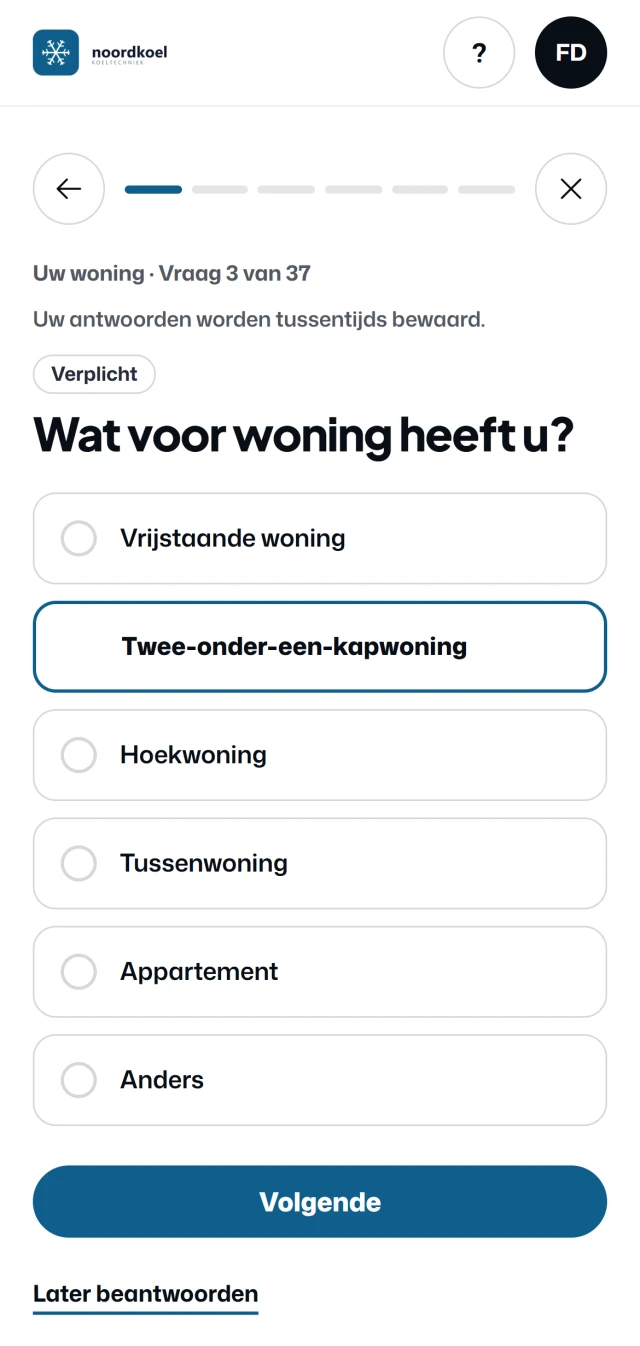
The questionnaire in the customer portal (Dutch screen): Your home, question 3 of 37, What type of home do you have, with Semi-detached house chosen and the buttons Next and Answer later.
The questionnaire your customer fills in before the site survey, with your logo. A real screen, in Dutch, from the customer portal of Noordkoel, our demo company, with a made-up customer.

the site survey/

The site survey starts in your customer's home.

With a heat pump you want to know what is in the meter cupboard and where the outdoor unit can go, before you visit. Fikst asks your customer in advance, in their own portal.

  1. your customer/ questionnaire
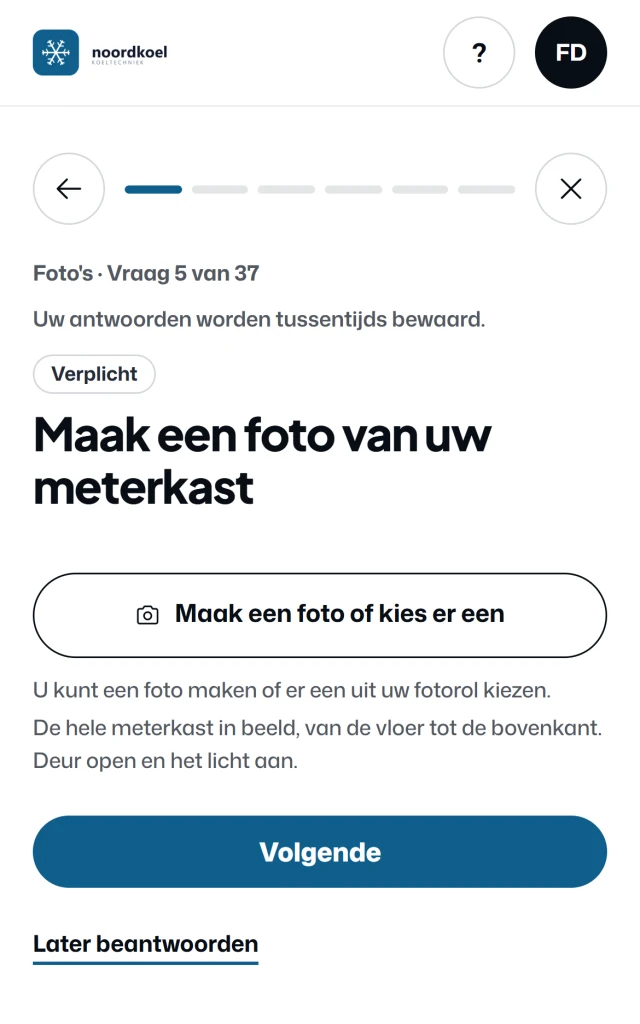
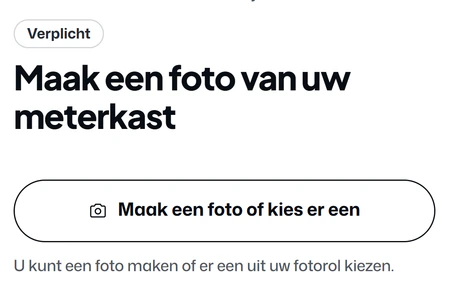
    The questionnaire in the Noordkoel customer portal (Dutch screen): Photos, question 5 of 37, Take a photo of your meter cupboard, with the button Take a photo or choose one.
  2. office/ customer record
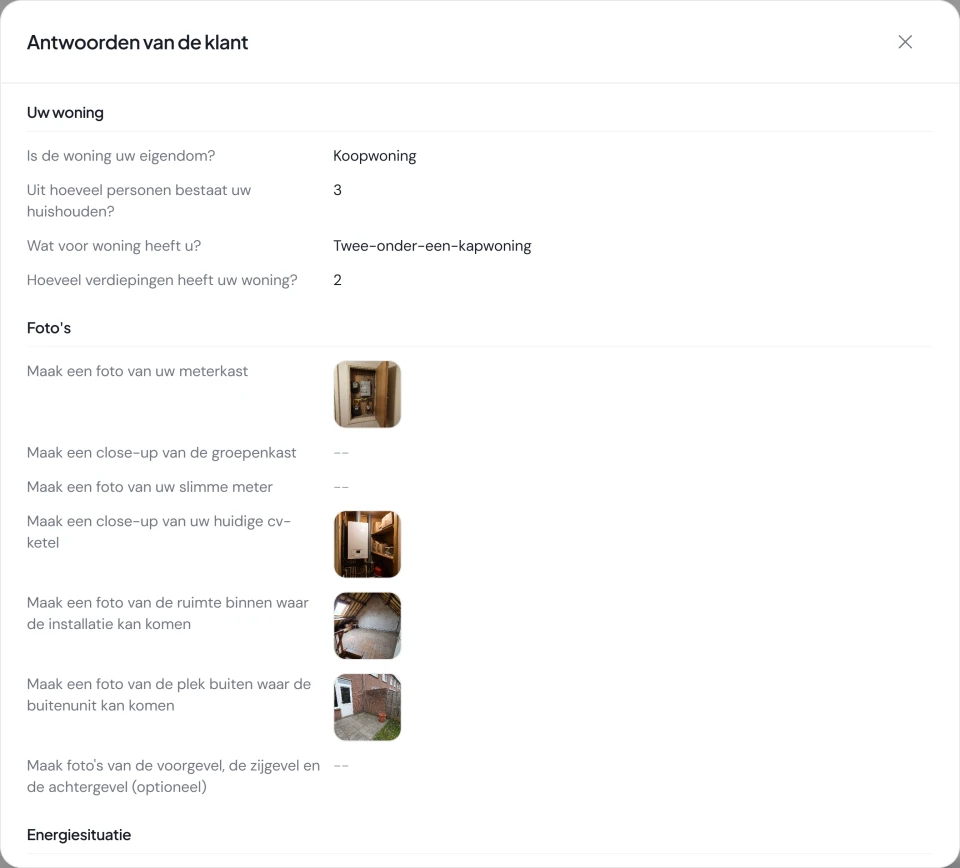
    The window Answers from the customer on the customer record in Fikst (Dutch screen): the answers about the home, and under Photos, for each question, the photo the customer took, such as the meter cupboard, the gas boiler and the spot for the outdoor unit.
  3. your adviser/ site survey app
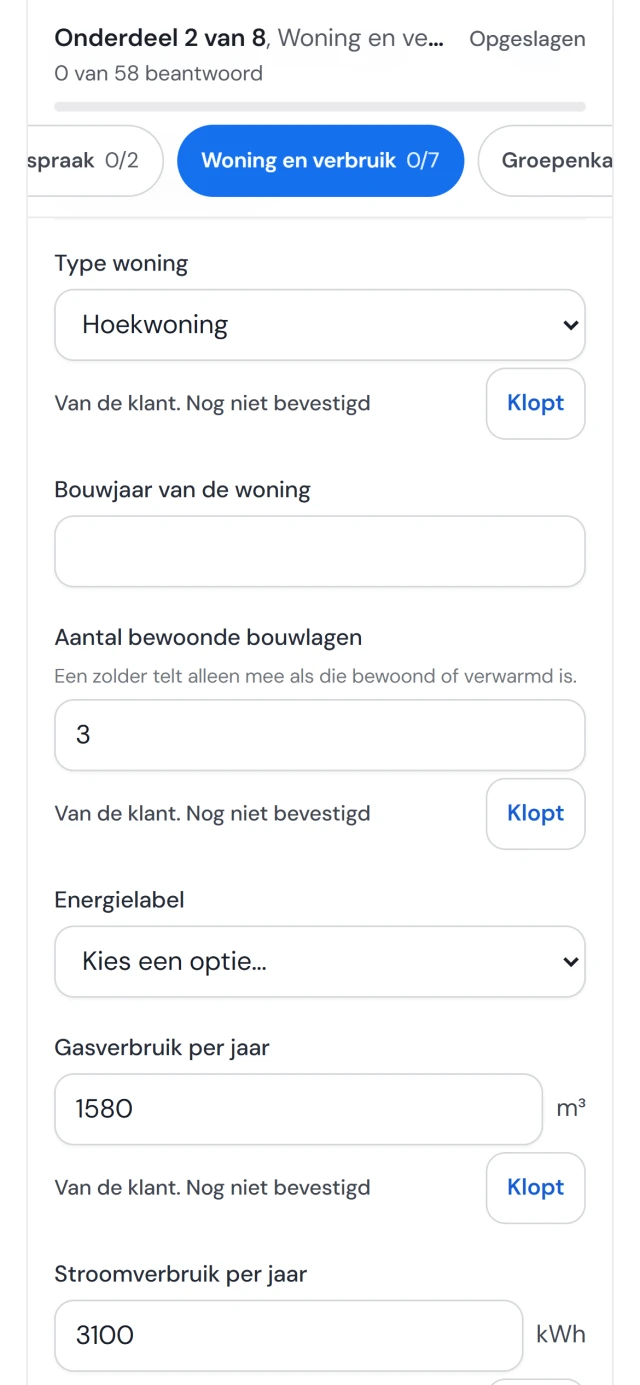
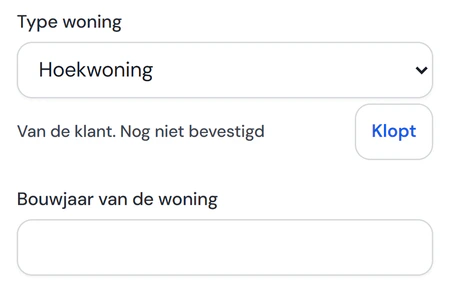
    The site survey form in Fikst on the adviser's phone (Dutch screen): type of home, number of occupied floors and gas consumption are already filled in, each with the line From the customer. Not yet confirmed, and the button Correct.

Real screens, in Dutch, from Noordkoel, our demo company. The example customers are made up.

heat loss and quote/

Heat loss calculation and heat pump advice, through to the quote.

  • The heat loss and the advice

    The year of construction and floor area come from the Dutch building register (BAG), the dimensions of the building from 3D BAG. Fikst calculates the heat loss according to the Dutch ISSO 51:2023 standard, and gives heat pump advice with the bivalence point. The calculation is included in your subscription.

  • The report

    A PDF with your logo, with every assumption in it, so someone else can check the sum. If you like, with the chosen heat pump and a paragraph on the Wkb, the Dutch Quality Assurance for Construction Act.

  • On the quote

    You put the recommended unit on a draft quote in one click, with variants if you want your customer to choose. Your customer signs digitally.

subsidy/

The Dutch ISDE subsidy on the quote, the invoice and in the portal.

The ISDE amounts for heat pumps and solar water heaters are in Fikst. Your customer applies for the subsidy themselves; you make sure they have everything RVO, the Netherlands Enterprise Agency, asks for.

  • On the quote

    The ISDE is shown as information below the total, with what your customer pays net after the subsidy. Your quote amount and the VAT do not change. If you choose a different heat pump, the amount adjusts.

  • On the invoice

    For each measure, the invoice shows the brand, type, registration code and amount, with the installation date and the installation address. No extra line or amount is added.

  • In your customer's portal

    If you switch on the ISDE file, then once the invoice is paid you prepare the invoice, a payment overview, a photo of the rating plate and a checklist with one button. Your customer then applies for the subsidy themselves with RVO.

heat pump/

A heat pump, from questionnaire to maintenance, in the real app.

From the questionnaire your customer fills in and the site survey to the heat loss calculation, the quote and the maintenance. Every card plays a short recording from Noordkoel, our demo company with made-up customers. Click it for the recording in full and what you do with it.

All the cards, with the rest of Fikst, are on the page with all features.

Drag or scroll to move around

Enlarged Fikst product screen

customer portal/

Your heat pump customers schedule their own maintenance.

After the installation your customer stays in their own portal, with your logo and colours. If they have a maintenance contract, they choose a time themselves that fits your route.

How the contract schedules the visits for a heat pump, you can read on the page about maintenance contracts.

What the planned Dutch requirement for the hybrid heat pump from 2029 means for the boilers at your customers' homes, you can read in the article about the hybrid heat pump from 2029.

Scheduling maintenance
your customer/ portal
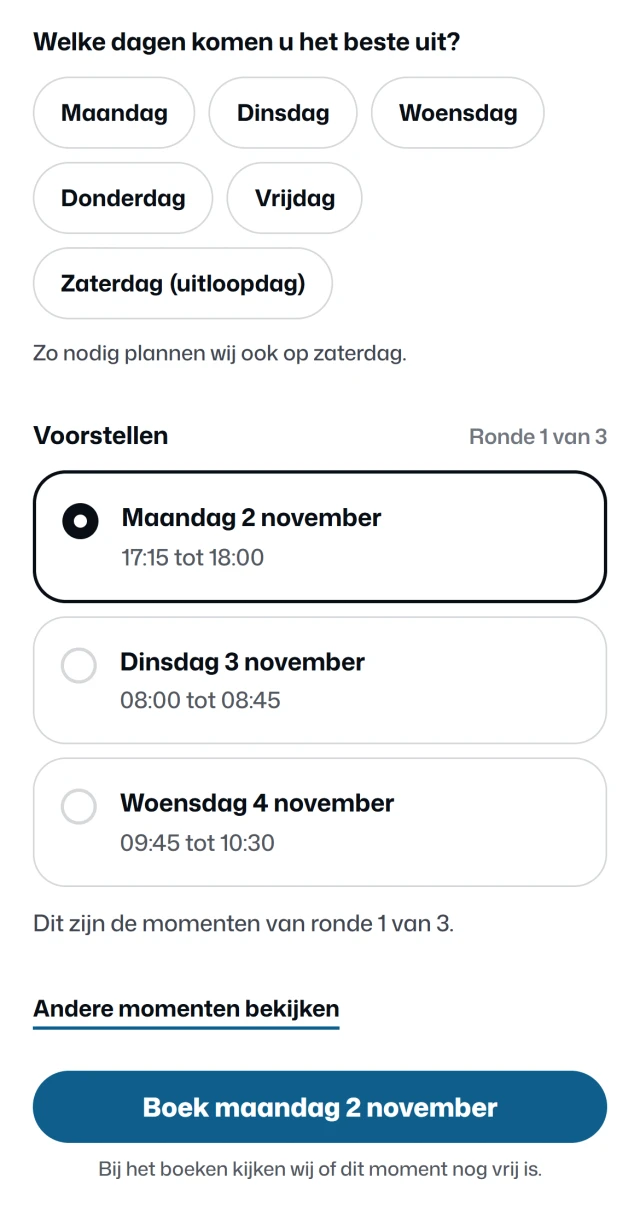
Scheduling maintenance in the customer portal (Dutch screen): which days suit you best, with Monday to Friday and Saturday as a spare day, three suggestions in round 1 of 3 with Monday 2 November from 17:15 to 18:00 selected, and the button to book Monday 2 November.

Your customer

Your customer says which days suit them, and whether they prefer mornings or afternoons. The only days on offer are the days you drive in their area.

On those days, Fikst looks for times with as little extra driving as possible next to the jobs already planned. Your customer picks one. None of them suit? Then they ask for a new round.
office/ planning board
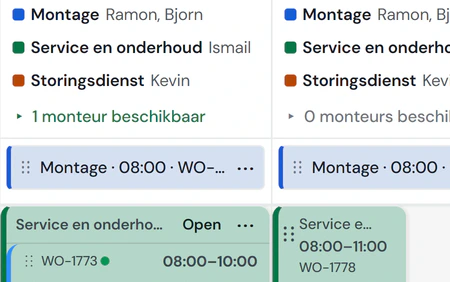
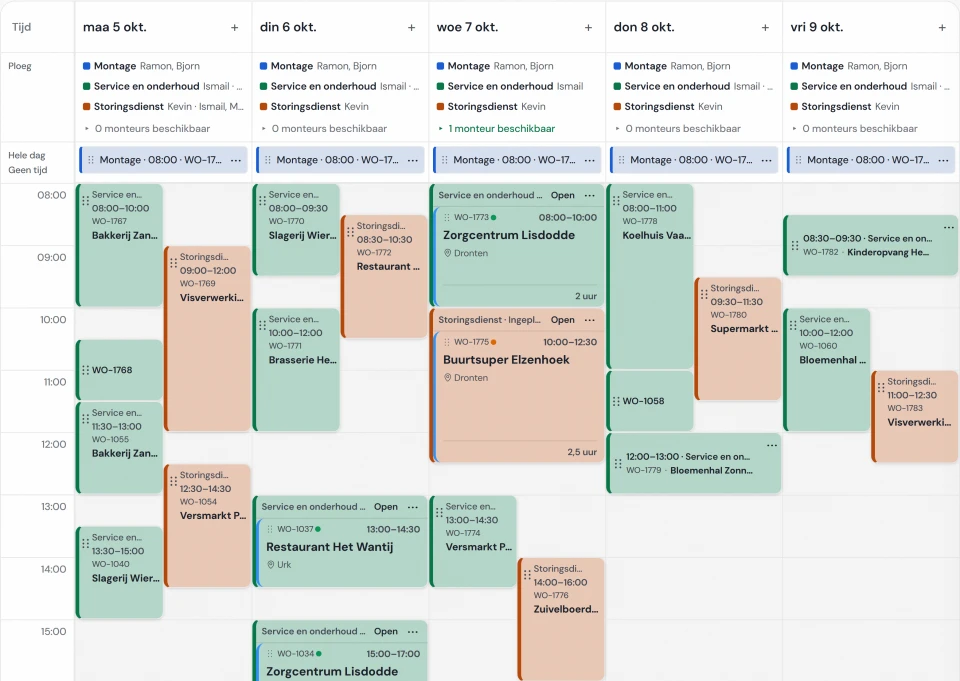
The Fikst planning board in week view (Dutch screen), with the work orders per day and the crew for each day at the top. A booked maintenance visit appears here as a work order.

At your end, in Fikst

When they book, Fikst checks once more that the time is still free. The visit then sits on your planning board as a work order, and you get a notification. No more phoning to fix a date.

You set the days and the areas in which you plan maintenance yourself. It works for customers with a maintenance contract, and for a visit you have already prepared.

The customer portal is included in your subscription. You also pay nothing per customer who logs in. Your customer can do more there, from requesting a maintenance contract to the questionnaire for the site survey.

How the customer portal works

Real screens (in Dutch) from the customer portal of Noordkoel, our demo company in refrigeration, with a made-up customer. The office screen comes from the same demo. You choose per feature what your customer can do.

refrigerant/

The refrigerant in your heat pumps.

If you switch on the F-gas records, every heat pump is in the register with its refrigerant, charge and CO2 equivalent, and the leak check interval follows from that by itself. Whatever your technician tops up or recovers goes into the log of that installation. If you only work with propane monoblocs, you leave it switched off.

  • What changes in 2027

    From 1 January 2027, an air-to-water split system up to and including 12 kW may only be placed on the market new with a refrigerant below GWP 150. So that is no longer possible with R32; topping up with R32 is still allowed.

  • The log

    You export the register per installation or per period, as CSV or Excel. The cylinder records and the equipment register are in the same system.

ai features/

Dictate the site survey and let Fikst read photos.

Two AI features for the site survey. Fikst prepares a suggestion and you check it.

  • Dictate a site survey

    you switch it on

    You walk through the house and say what you see. Fikst then fills in the site survey form and you check the answers. If Fikst is unsure about something, that is at the top.

    See what it looks like
  • Read photos

    you switch it on

    Fikst looks at a photo of, for example, the meter cupboard and suggests values from a fixed list, each with how certain it is. In the site survey app it works on its own; on the customer questionnaire it is part of the customer portal.

    See what it looks like

You approve it. Nothing goes into Fikst until you accept it. AI is included and is not expensive: the features use credit, and every company starts with 5,000 free credits. Which actions you can take depends on your access and permissions.

Already working with your own AI, such as Claude? See what you can ask through the MCP connection.

our first customer/

Fully live within two months.

At Elite Klimaat Groep in Hilversum, Fikst runs in production every day, with invoicing, purchasing and the bank in it. Six separate packages were dropped.

packages dropped
6
what they cost per year
€14,880
Fikst per year, according to the pricing page
€3,600
people, 6 of them in the office
22

Amounts excluding VAT. What they pay as launching partner, we do not disclose. Two months was their lead time. How long it takes for you depends on your team and your data.

how we work/

The agreements, in advance and on paper.

What you want to know before you move your whole company to another system. It is also in the terms.

  • Cancel monthly

    You cancel at the end of the month. The first month after go-live is free and without a contract; after that you decide whether to continue.

  • Your data stays yours

    If you cancel, you get all your data in a usable, machine-readable format.

  • Everything is in the price

    No add-ons. New parts are added without you paying more within your subscription.

  • Your technicians pay nothing

    You pay per office user. Anyone who only works in the field does not count, however many technicians you have.

  • You know the implementation in advance

    The implementation is a one-off cost, at a fixed price we agree with you in advance. It depends on the size of your team and what needs to be moved across. Going live usually takes one or two months.

  • You talk to the builder

    We build the software and implement it ourselves, without an implementation partner in between. For support you get the person who built it on the line.

Work out what it costs for your team or read how switching works. Ask for an estimate for the implementation.

Questions we often get.

All frequently asked questions
Does the heat loss calculation cost extra?

No. It is included in your subscription. Fikst switches the module on for you; there is no separate licence and no price per calculation.

Is the Dutch ISDE subsidy shown on the quote and the invoice?

Yes. On the quote the ISDE is shown as information below the total, with what your customer pays net after the subsidy; your quote amount and the VAT do not change. On the invoice, each measure shows the brand, type, registration code and amount, with the installation date and the address. If you switch on the ISDE file, then once the invoice is paid you prepare the documents in your customer's portal, and they apply for the subsidy themselves with RVO.

Can a visitor to my website already see what a heat pump would bring them?

Yes, with the enquiry widget on your own website, in your house style. The visitor enters their postcode and house number, confirms their home and answers five short questions. They then see the capacity needed, whether a hybrid or a fully electric heat pump fits, fitting units from your own products and the Dutch ISDE subsidy per unit. If they heat with gas now, they also see roughly what they save. Only then do they leave their name, email and phone number. The full calculation is stored with the lead, and you see at which step visitors drop out.

We do solar panels and air conditioning. Will that become a mess?

No. Everything sits with the same customer and the same address, with its own work order and checklist for each type of work. In the register you see all units at an address one below the other, and you have one planning board.

Is Fikst also suitable for a sole trader or a small team?

Yes. You get the same system as a large company, without add-ons. You pay €50 per office user per month, excluding VAT, and your technicians do not count. If you only work with quotes and invoices, you need less than Fikst. If you also schedule technicians, do maintenance or work with F-gases, you have all of that in one system.

Work out an estimate for your team
What does Fikst cost?

€50 per office user per month. Technicians pay nothing. With five people in the office you come to about €250 a month, excluding VAT. The implementation is a one-off cost, at a fixed price we agree with you in advance. It depends on the size of your team and what needs to be moved across. Ask for an estimate.

Work out an estimate for your team
How much work is the switch?

That depends on where you are now. We start with a short scan of how you work and what you use. Then we set up Fikst alongside your current systems, and we only switch over once it runs. We bring over customers, installations, products and contracts from what you have.

How the implementation works
Are we tied to anything?

Fikst can be cancelled monthly. Your data stays yours, and when you leave you take everything with you in a usable format. Switching does take time: a system your whole company works in is not something you leave in an afternoon.

See how this works for your heat pump work?

In a 30-minute introductory call we look at how you work and show you Fikst live. With five people in the office you pay €250 a month, and your technicians cost nothing.