become a launching partner NL

maintenance/ service contracts

Maintenance that follows from the contract.

Maintenance on air conditioners and heat pumps is where your recurring revenue comes from. In Fikst each customer has a service contract, with the installations it covers, how often a visit is due and what it costs. The work orders and the invoice follow from it, if you switch that on. If you work with refrigerant, the leak checks sit alongside.

Service contracts and the customer portal are included in your subscription. You pay per office user, your technicians do not count.

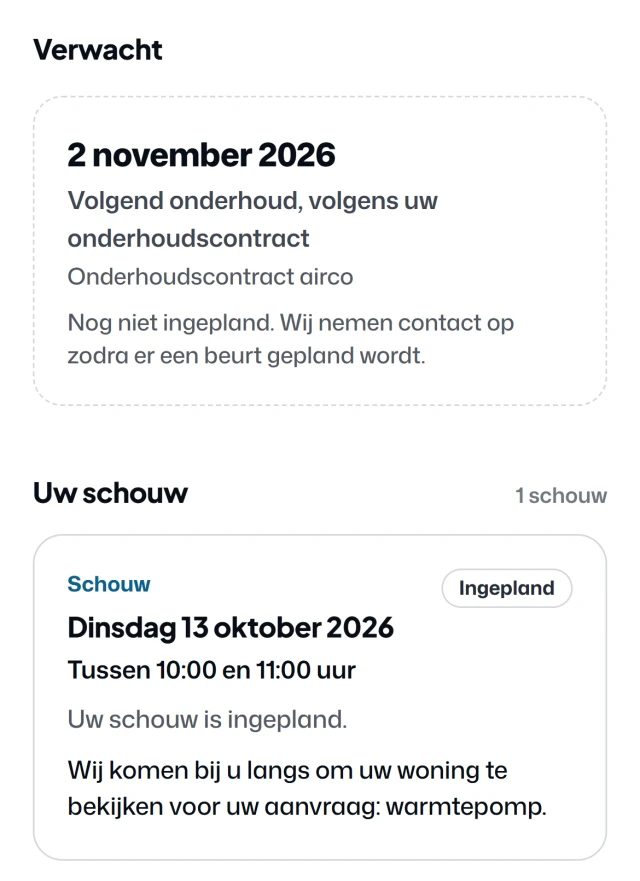
Appointments in the customer portal (Dutch screen): the next maintenance visit under the maintenance contract, expected on 2 November 2026, and the site survey on Tuesday 13 October 2026 between 10:00 and 11:00.
What your customer sees: their next visit under the contract. A real screen, in Dutch, from the customer portal of Noordkoel, our demo company, with a made-up customer.

the contract/

One contract per customer, with their units in it.

A standard contract, a premium one, one for the heat pump or a one-off visit. Your customer signs it digitally. If the house gets a new owner, you transfer the contract. A later price change is recorded with a reason, and the signed copy stays as it was.

  • The installations it covers
  • The type of contract and how often a visit is due
  • The price, with the contract lines below it
  • When you invoice: per period, or after the visit
  • The date of the next visit and of the next invoice

the visits/

The next visit is already prepared.

If you switch on the maintenance generator, Fikst creates a work order for each installation on the contract on the date of the next visit. It goes into your backlog, and the date of the next visit moves on with the frequency of the contract. Rather do it by hand? Then you schedule the visit from the contract.

How long a visit takes, Fikst works out from what is installed at the customer: outdoor units, extra indoor units or a heat pump. For that you enter your own times once.

You schedule on the planning board. Or you leave it to your customer, in their own portal.

leak checks/

Every mandatory leak check in one list.

For each installation, Fikst works out from the refrigerant, the charge and the leak detection how often it has to be checked, and when the next check is due. The check planning lists them all: what is coming up, what is overdue and what is already scheduled. If there is no work order for it yet, you create one in one click.

office/ installation
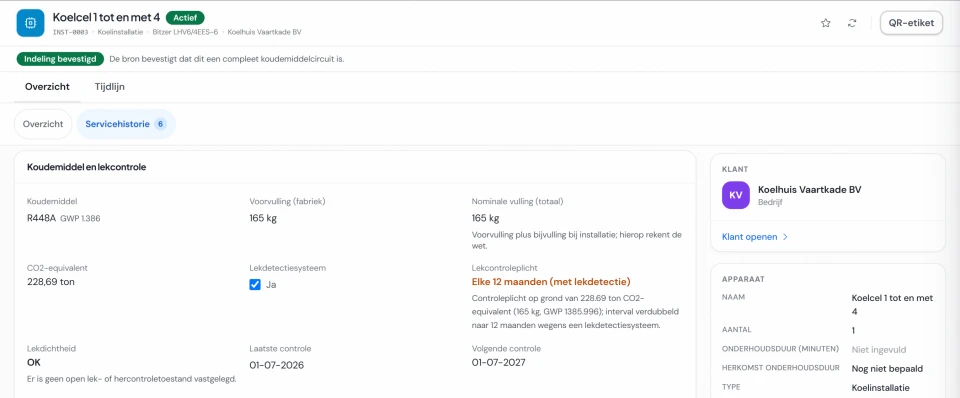
Installation Cold room 1 to 4 in Fikst (Dutch screen), with the Service history tab and the block Refrigerant and leak check: R448A, 165 kg, 228.69 tonnes CO2 equivalent, leak detection present, leak check required every 12 months, last check 1 July 2026 and next check 1 July 2027.

per unit/

What happened to that one unit.

Each installation has its service history: the work orders and service requests attached to it. You see when the next leak check is due and how long a visit there takes. The rhythm of the visits is on the contract that covers the unit.

When a fault comes in, you see straight away in the service requests whether the unit has a contract. Whether your contracts also cover faults, you decide yourself. If they do not, it says the fault is not covered.

office/ service requests
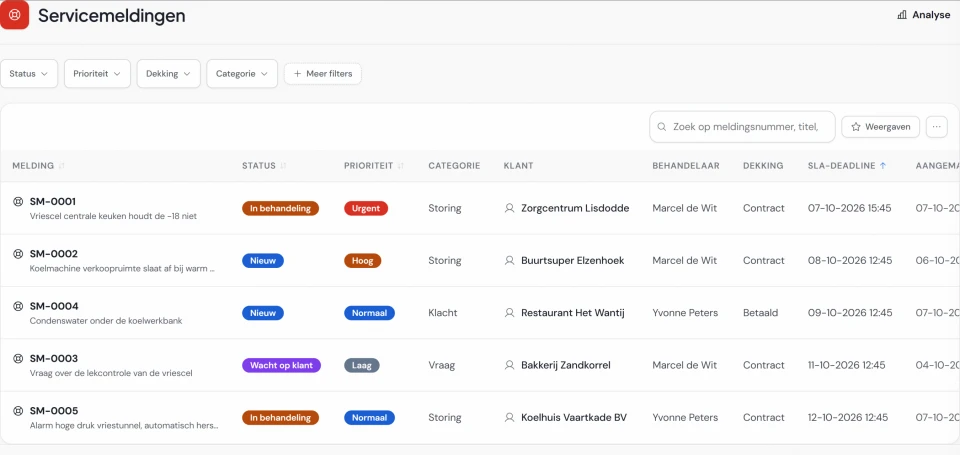
The service requests in Fikst (Dutch screen): for each request the status, priority, category, customer, assignee, the coverage contract or paid, and the deadline.

customer portal/

Your customer schedules their own visit.

If they have a contract, or you have prepared a visit for them, they choose a time themselves in their portal. No contract yet? Then they request one there from your maintenance packages. A subscription is then ready for you as a draft, and a one-off visit becomes a quote.

Scheduling maintenance
your customer/ portal
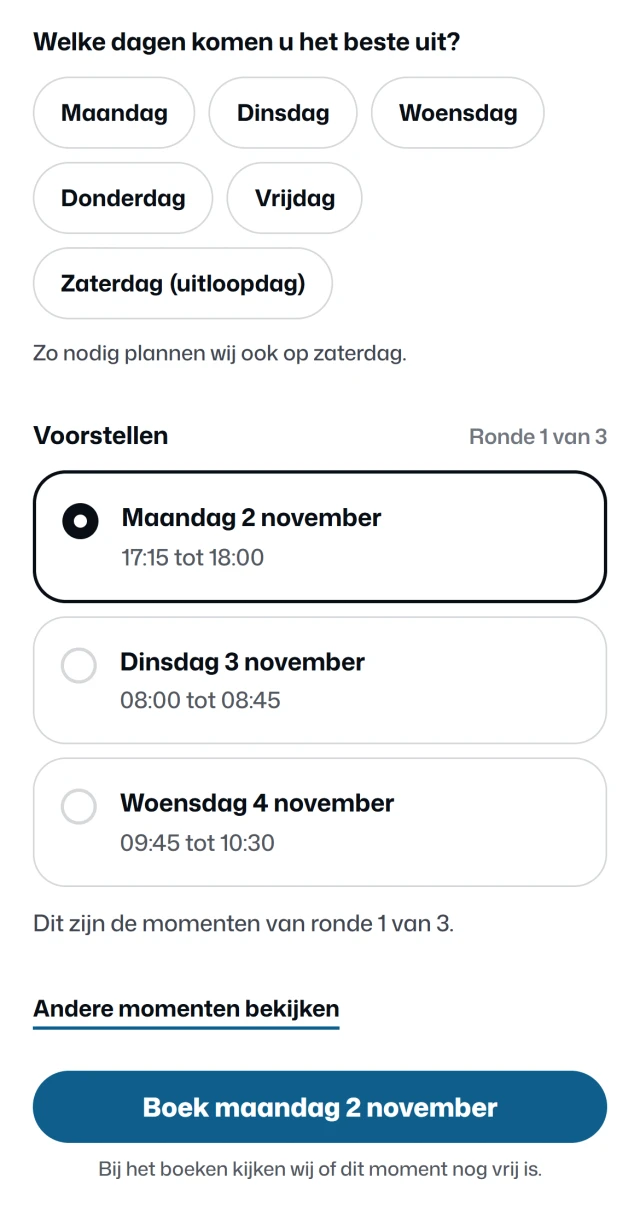
Scheduling maintenance in the customer portal (Dutch screen): which days suit you best, with Monday to Friday and Saturday as a spare day, three suggestions in round 1 of 3 with Monday 2 November from 17:15 to 18:00 selected, and the button to book Monday 2 November.

Your customer

Your customer says which days suit them, and whether they prefer mornings or afternoons. The only days on offer are the days you drive in their area.

On those days, Fikst looks for times with as little extra driving as possible next to the jobs already planned. Your customer picks one. None of them suit? Then they ask for a new round.
office/ planning board
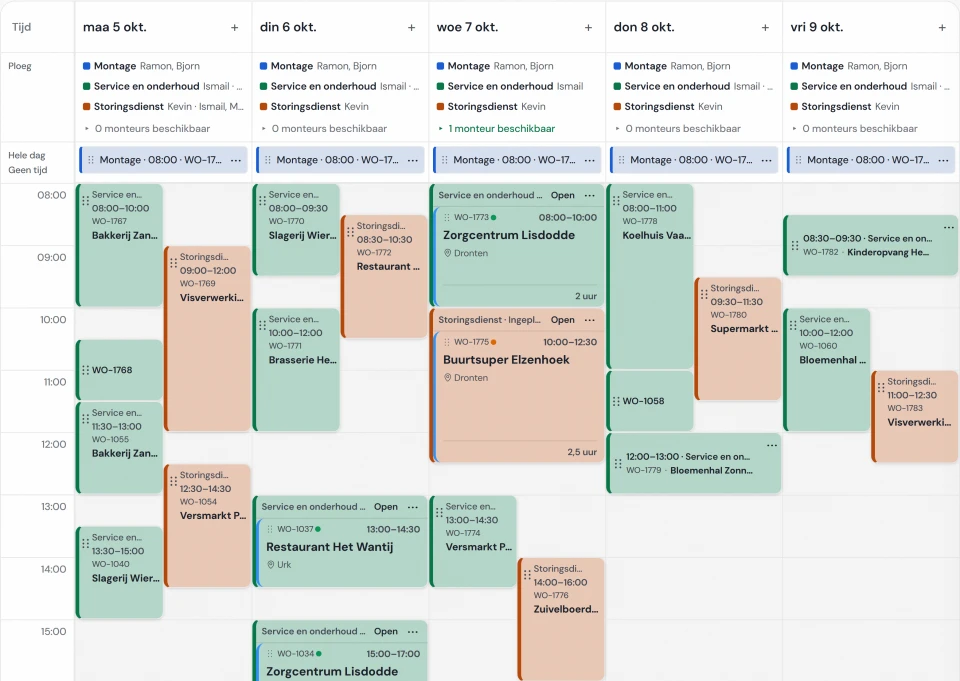
The Fikst planning board in week view (Dutch screen), with the work orders per day and the crew for each day at the top. A booked maintenance visit appears here as a work order.

At your end, in Fikst

When they book, Fikst checks once more that the time is still free. The visit then sits on your planning board as a work order, and you get a notification. No more phoning to fix a date.

You set the days and the areas in which you plan maintenance yourself. It works for customers with a maintenance contract, and for a visit you have already prepared.

The customer portal is included in your subscription. You also pay nothing per customer who logs in. Your customer can do more there, from requesting a maintenance contract to the questionnaire for the site survey.

How the customer portal works

Real screens (in Dutch) from the customer portal of Noordkoel, our demo company in refrigeration, with a made-up customer. The office screen comes from the same demo. You choose per feature what your customer can do.

invoicing/

The contract invoice is ready as a draft.

For each contract you choose when to invoice: per invoicing period, or after the visit has been carried out. If you switch on the contract invoice, Fikst creates a draft invoice on the invoice date. You check it and send it yourself. Nothing goes out on its own.

If you invoice after the visit, you create the contract invoice from the work order your technician has completed. The contract lines then appear separately on the invoice, for example the subscription and an extra indoor unit.

Questions about maintenance contracts.

All frequently asked questions
Does Fikst create the maintenance visits itself?

Yes, once activated. On the date of the next visit, the maintenance generator prepares a work order for each installation on the contract and moves the next date on. With self-scheduling set up, the customer is offered times that fit the route and capacity. They choose in the customer portal and the booking appears on the planning board automatically. That way the chain can run without scheduling each visit by hand. Your company decides the availability and scheduling rules in advance. Scheduling by hand remains possible.

Can my customer schedule their own maintenance?

Yes, in the customer portal. They say which days suit them and choose from a few times on days when you are driving in their region, with as little extra driving time as possible. When they book, the visit appears on your planning board as a work order. They can reschedule it themselves within the period you set.

How do I keep track of leak checks?

For each installation, Fikst works out from the refrigerant, the charge and the leak detection how often it has to be checked. The check planning lists all checks: what is coming up, what is overdue and what is already scheduled. One click turns a check into a work order. For this we switch on the F-gas records for you during set-up.

How do I invoice a maintenance contract?

For each contract you choose when to invoice: per invoicing period, or after the visit has been carried out. If you switch on the contract invoice, a draft invoice is ready for you on the invoice date. You send it yourself, so you see it first. If you invoice after the visit, the contract lines appear separately on the invoice.

Can my customer pay their maintenance contract by direct debit?

Yes, through Mollie. You set the contract to direct debit. The customer pays the first invoice of that contract online and gives the mandate with it; the contract shows that the mandate is active. The next contract invoices carry the Collect button, and Fikst debits exactly the amount outstanding. The payment shows on the invoice by itself after a few working days. You need a Mollie account with direct debit enabled.

Can a customer request a contract in the portal?

Yes. They choose a subscription or a one-off visit from your maintenance packages. A subscription is then ready for you as a draft, and a one-off visit becomes a quote. They sign the contract digitally.

Does this cost extra?

No. Service contracts and the customer portal are included in your subscription. You pay per office user, and your technicians do not count.

Would you like to see your own contracts in Fikst?

In a 30-minute introductory call we look at how you work and show you Fikst live. With five people in the office you pay €250 a month, and your technicians cost nothing.