One planning board for your technicians and your crews.
The planning board is the Fikst scheduling software for your installation company.
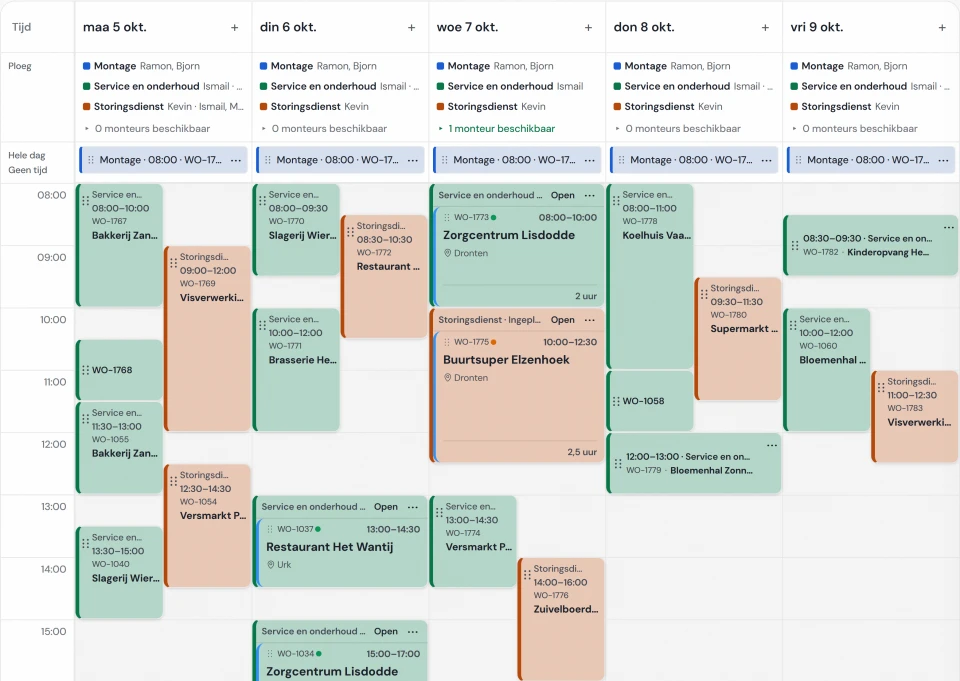
For each day you see which crew is where, who is free and what still needs scheduling. You drag a job
to a day, and your technician sees it in their work order app.
The planning board is included in your subscription. You pay per
office user. Your technicians do not count.
The lane week view with the crew per day. A real screen, in Dutch, from Noordkoel, our demo
company; you set up the lanes yourself.
per crew and per day/
Look at it the way you plan.
The week from left to right, or one day as a timeline. In the lane week view your lanes sit one below
the other, for example installation, service and emergency callouts, and you can also group by
technician. On the map you see where that day's jobs are.
Which views your team gets and which one the planning board opens with, you set per company. If you
only want to see the emergency callouts, you choose that one lane.
on the planning board/
What you do with it every day.
01
Who is on the job
For each lane you set the crew, for the whole week or per day. Every job in that lane then goes to that crew, and at the top of each day you see who is on and how many technicians are still available. You can see who changed the crew, and you undo the last change with one click.
If someone else needs to come along, you put them on the work order itself, next to the lead technician. What is on the work order takes priority over the crew of the lane.
02
Jobs that take several days
A three-day installation gets three day blocks, each with its own start time and its own number of hours. If it runs over, you add a day. You see the crew per day on the work order. If the job still is not finished, you plan a follow-up visit on the same work order, in a different lane if need be.
03
Absence alongside
Holidays, a training course or a day off are on the board, even if it is only an afternoon. They count towards the number of technicians available. You cannot schedule someone in a time slot when they are absent; the planning board stops you.
04
Dragging from your backlog
What still needs scheduling is in your backlog: first what is late or urgent, then what is ready to schedule. You drag a job to a lane and a day. In the day view you make it longer or shorter, and you undo a wrong move.
And the travel time?
Fikst estimates the travel time between two addresses as the crow flies, with a margin for the road. If
there is too little time between two jobs, the planning board warns you. Smart scheduling suggests a lane
and a day with the least detour for work from your backlog. It stays a suggestion: nothing moves until
you confirm it. It is not a route planner with real roads.
customer portal/
Maintenance that fits your route.
In the customer portal your customer books their own maintenance, on a day when you are in their area anyway. The visit lands on your planning board as a work order, between the jobs already there.
Scheduling maintenance
your customer/ portal
Your customer
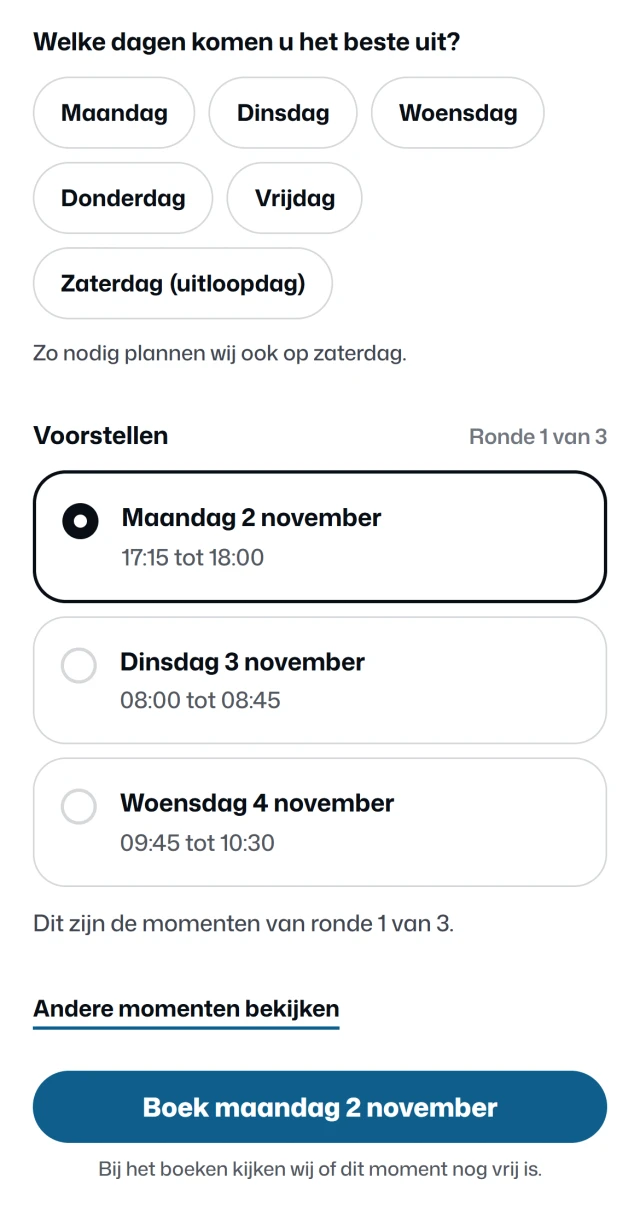
Your customer says which days suit them, and whether they prefer mornings or afternoons. The only days on offer are the days you drive in their area.
On those days, Fikst looks for times with as little extra driving as possible next to the jobs already planned. Your customer picks one. None of them suit? Then they ask for a new round.
At your end, in Fikst
When they book, Fikst checks once more that the time is still free. The visit then sits on your planning board as a work order, and you get a notification. No more phoning to fix a date.
You set the days and the areas in which you plan maintenance yourself. It works for customers with a maintenance contract, and for a visit you have already prepared.
The customer portal is included in your subscription. You also pay nothing per customer who logs in. Your customer can do more there, from requesting a maintenance contract to the questionnaire for the site survey.
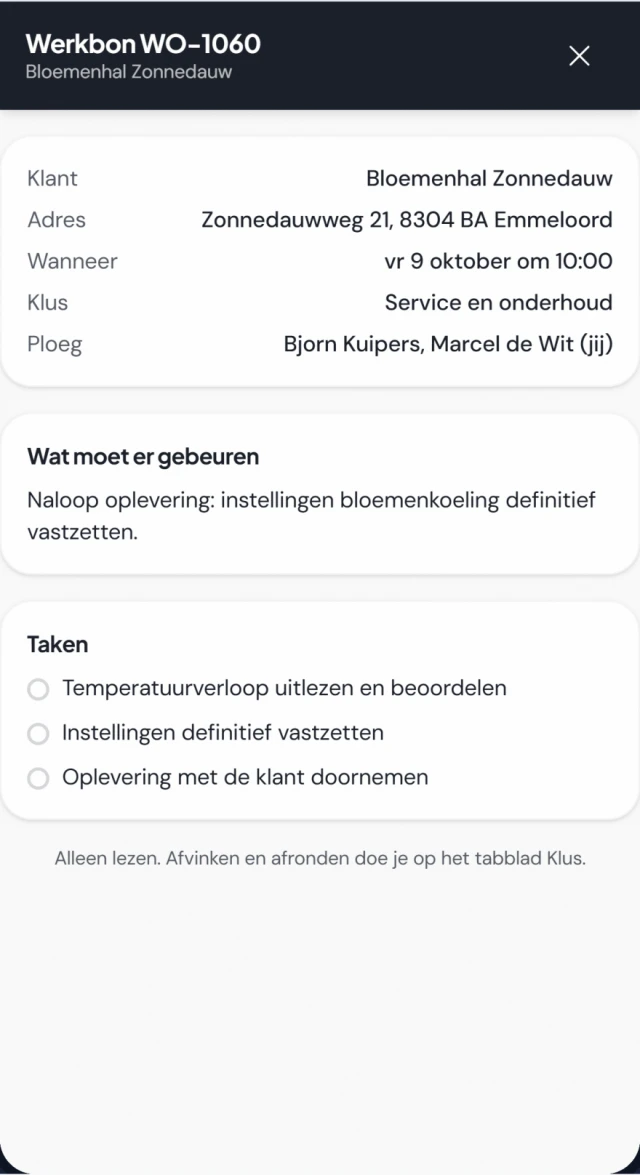
Real screens (in Dutch) from the customer portal of Noordkoel, our demo company in refrigeration, with a made-up customer. You choose per feature what your customer can do.
your technician/ work order
on the phone/
What you schedule is in their work order app.
Your technician sees their jobs for the day in time order. Also the jobs of their crew, and the days of
a job that takes longer. Each job shows who they are working with. Their list refreshes when they open
the app or pull down.
Yes. You divide your planning board into lanes, for example installation, service and emergency callouts. For each lane you set the crew for the whole week or per day, and you copy last week’s crew in one go. A job in that lane then goes to that crew. If you put a technician directly on the work order, that takes priority.
What do I do with a job that takes several days?
You give it day blocks. For each day you set the start time and the number of hours, and you add or remove a day if the work runs over. On the planning board the job appears on every day it covers. A project of a few weeks is scheduled the same way, as one work order.
Does the planning board show who is available?
Yes. Holidays, a training course or a day off are on the board, even if it is only part of the day. They count towards the number of technicians available that day, and you cannot schedule someone in a time slot when they are absent. Sick leave is a separate setting you switch on if you want to track it in Fikst.
Does Fikst work out the travel time?
Fikst estimates the travel time between two addresses as the crow flies, with a margin for the road. If there is too little time between two jobs, the planning board warns you. Smart scheduling suggests a lane and a day with the least detour, but moves nothing without you. It is not a route planner with real roads.
Does my technician see the schedule on their phone?
Yes. In the work order app they see their jobs for the day, including those of their crew and the jobs that take several days. Their list refreshes when they open the app or pull down.
Does the planning board cost extra?
No. The planning board is included in your subscription. You pay per office user, and your technicians do not count.
Would you like to see your own week on the planning board?
In a 30-minute introductory call we look at how you work and show you Fikst live. With five people in the office you pay €250 a month, and your technicians cost nothing.